
$SCR on Polygon PoS · Step-by-step guide

How to Buy $SCR Tokens on Polygon by Strategic Crypto Reserve

$SCR is the Polygon ERC-20 token behind the Strategic Crypto Reserve NFT ecosystem. To buy it you need a self-custody wallet on the Polygon network, a little POL for gas, and the official SCR contract. This guide covers MetaMask, Coinbase Wallet, Trust Wallet, Phantom and Rabby, how to import the token, how to bridge in MetaMask and where to swap.

Only one contract is real: 0x0ffd960881C83Cd63a50d5C944C9F2B866f55a28 on Polygon. $SCR is a utility token for entertainment and community use, not a security or financial advice.


Building an AI or mining data center? Try the free AI Build Configurator demo, or see licences from C$4,000.

How to buy $SCR tokens: Strategic Crypto Reserve coin mascot with POL coins on the Polygon network

$SCR Token Details and Contract Address

$SCR is an ERC-20 token on Polygon PoS, the network many wallets still label "Polygon (MATIC)". Polygon's gas token is now POL, which replaced MATIC. You pay fees in POL, and SCR itself sits in your wallet like any other Polygon token.

0x0ffd960881C83Cd63a50d5C944C9F2B866f55a28
Network
Polygon PoS (chain ID 137)
Contract
0x0ffd960881C83Cd63a50d5C944C9F2B866f55a28
Name / symbol
Strategic Crypto Reserve / SCR
Decimals
18
Main pool
QuickSwap SCR/DAI (GeckoTerminal chart)
Explorer
PolygonScan token page

Copy the address from this page, the PolygonScan link or the Strategic Crypto Reserve homepage, and check the first and last few characters every time. Look-alike tokens can copy the SCR name and logo, but nobody can copy the contract address.
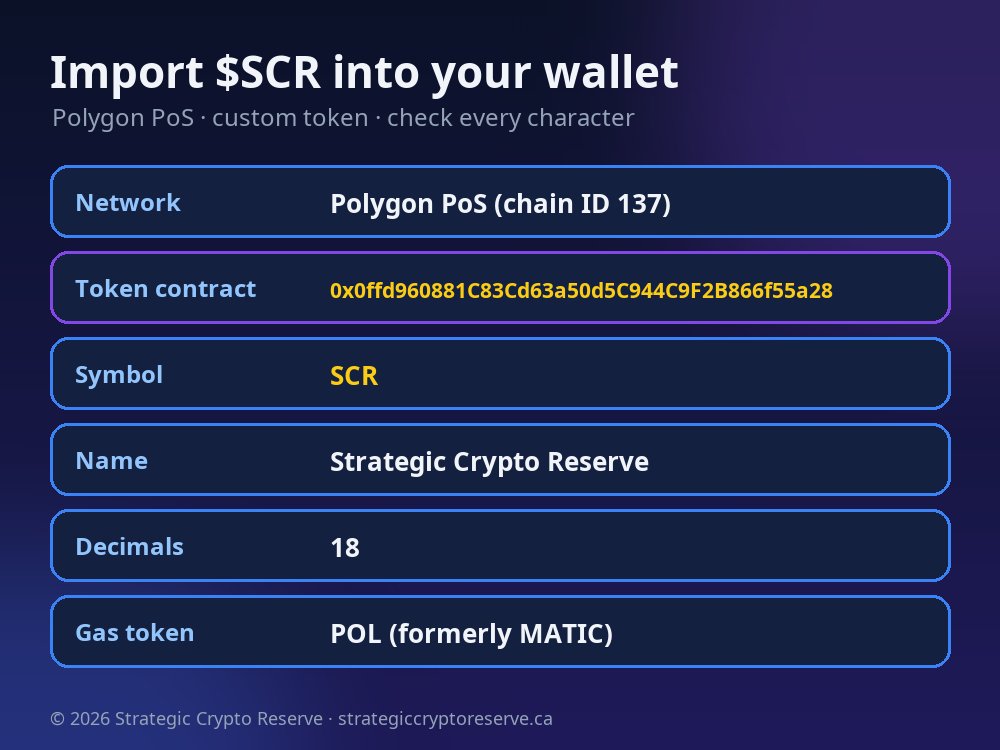
SCR token import details: Polygon PoS, contract 0x0ffd960881C83Cd63a50d5C944C9F2B866f55a28, symbol SCR, 18 decimals

How to Buy $SCR in 6 Steps

  1. Install a self-custody wallet such as MetaMask, Coinbase Wallet, Trust Wallet, Phantom or Rabby, and write down your recovery phrase offline.
  2. Switch to the Polygon network in the wallet's network menu.
  3. Get POL for gas by buying it in the wallet, sending it from an exchange on the Polygon network, or bridging it in MetaMask.
  4. Import the SCR contract 0x0ffd960881C83Cd63a50d5C944C9F2B866f55a28 so your balance shows (how).
  5. Swap POL, DAI or USDC for SCR on QuickSwap, MetaMask Swap or SushiSwap, with the SCR contract pasted as the "to" token.
  6. No quote, or the swap fails? Raise slippage slightly (0.5% to 1%, then 2 to 3%) and try again.

Buy $SCR in the 5 Most Popular Self-Custody Wallets

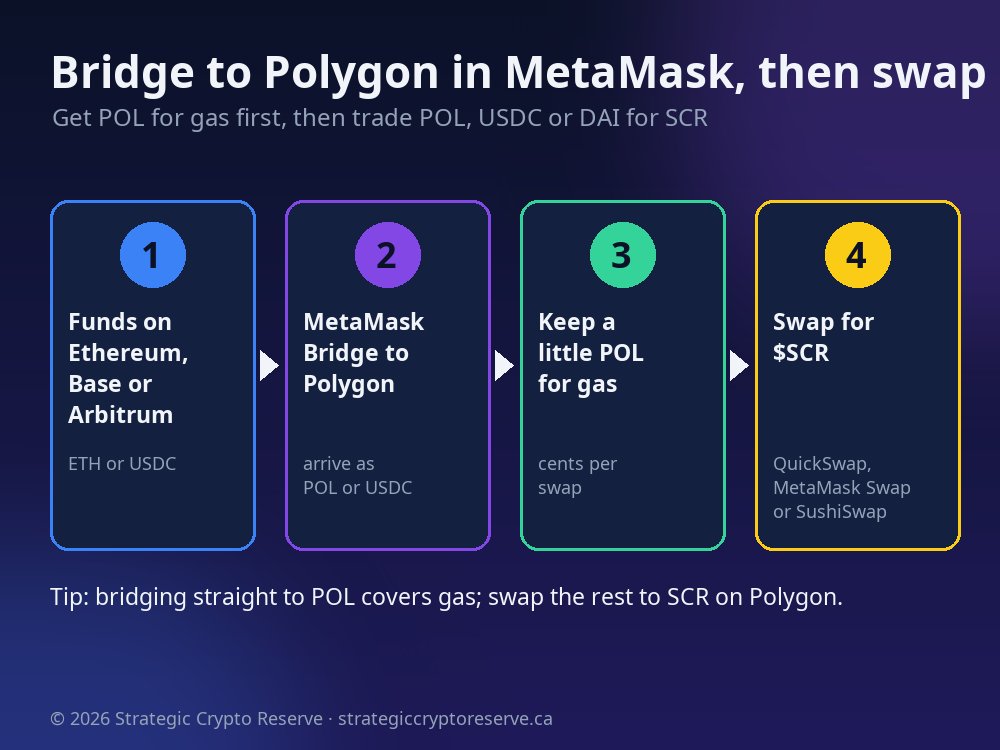
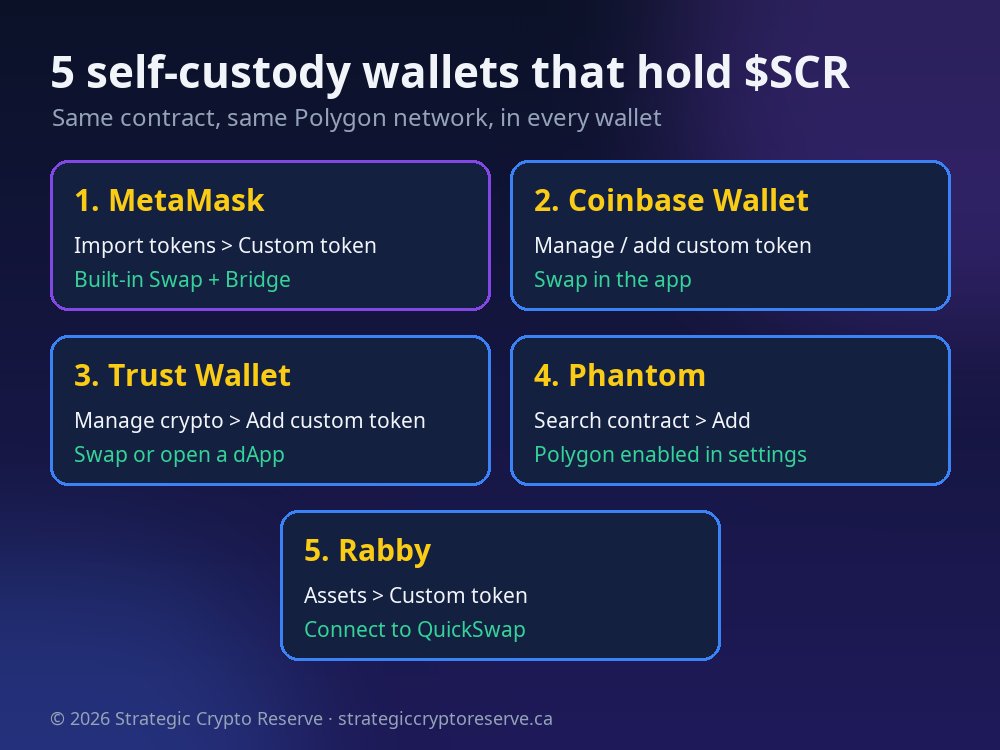
Five self-custody wallets that hold $SCR on Polygon: MetaMask, Coinbase Wallet, Trust Wallet, Phantom and RabbyBridge to Polygon in MetaMask, keep POL for gas, then swap for $SCR on QuickSwap, MetaMask Swap or SushiSwap

Every wallet below holds the same $SCR, because it lives on the Polygon blockchain, not in the app. Menu names change between app versions, but the steps stay the same: Polygon network, import the contract, swap.

1. MetaMask (extension and mobile)

  1. Open the network menu and choose Polygon. If it isn't listed, add it from the Popular networks list.
  2. In the Tokens tab, choose Import tokens, then Custom token, set Polygon as the network and paste the SCR contract. Symbol SCR and 18 decimals fill in automatically. Confirm with Import.
  3. Tap Swap, choose POL (or USDC/DAI) as the "from" token and paste the SCR contract as the "to" token. Review the quote and swap.
  4. Coming from another network? Use the built-in Bridge first (steps below).

2. Coinbase Wallet (Coinbase's self-custody app)

  1. This is the separate self-custody app, not your Coinbase exchange account. It was called the Base app for a while before going back to the Coinbase Wallet name.
  2. Make sure you have POL on Polygon. Polygon is a supported network in the app.
  3. Search the asset list for the SCR contract, or wait for it to appear after your first swap. Tokens you receive on supported networks normally show up on their own.
  4. Swap in the app if it offers the SCR pair, or open QuickSwap in the app's browser, connect, and swap on Polygon.

3. Trust Wallet

  1. On the home screen, open the token list settings (Manage crypto) and choose Add custom token.
  2. Set the network to Polygon, paste the SCR contract and check the name (Strategic Crypto Reserve), symbol (SCR) and decimals (18). Save.
  3. Fund the wallet with POL on Polygon, then use Swap. If SCR has no route there, open QuickSwap in the dApp browser or connect with WalletConnect.

4. Phantom

  1. Phantom started on Solana and also supports Polygon. Check that Polygon is switched on in the wallet's network settings.
  2. Search for the token by pasting the SCR contract, then add it to your list.
  3. Hold POL on your Polygon address and connect Phantom to QuickSwap to swap for SCR. Always make sure the connection is on the Polygon network, not Solana.

5. Rabby

  1. Rabby is a browser-extension wallet built for EVM chains, and it detects Polygon tokens across chains automatically.
  2. If SCR doesn't appear, add it as a custom token: pick Polygon and paste the contract.
  3. Use Rabby's Swap, or connect to QuickSwap. Rabby shows a pre-sign check of what each transaction will do, which is a useful extra safety step.

How to Import the SCR Smart Contract

Wallets only show tokens they know about. Importing the SCR smart contract tells your wallet to read your SCR balance from the Polygon blockchain. It doesn't cost gas and it doesn't move any funds.

  1. Switch the wallet to Polygon. Importing on Ethereum or Base shows nothing, because SCR lives on Polygon.
  2. Find Import tokens, Add custom token or Manage tokens.
  3. Paste the contract:
0x0ffd960881C83Cd63a50d5C944C9F2B866f55a28
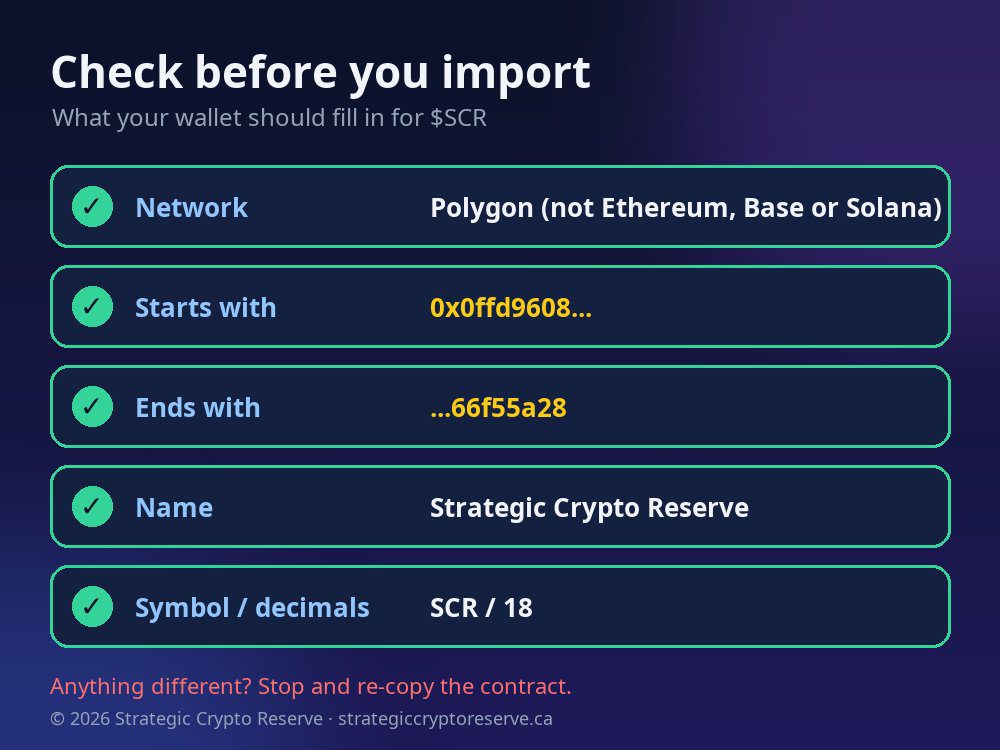
  1. Check what fills in: name Strategic Crypto Reserve, symbol SCR, decimals 18. If the wallet shows different values, stop and check the address again.
  2. Save. Your SCR balance, including 0 before you buy, now appears with your other tokens.

Swap sites work the same way: paste the contract into the token search box and accept the "import token" warning only if the address matches this page.

Check before you import $SCR: Polygon network, contract starts 0x0ffd9608 and ends 66f55a28, name Strategic Crypto Reserve, SCR, 18 decimals

How to Bridge Tokens to Polygon in MetaMask

Bridge to Polygon in MetaMask, keep POL for gas, then swap for $SCR on QuickSwap, MetaMask Swap or SushiSwap

If your crypto is on Ethereum, Base, Arbitrum or another network, you don't need an exchange. MetaMask has a built-in Bridge that moves funds to Polygon, and it can swap them into a different token in the same transaction.

  1. Open MetaMask and press Bridge on the home screen.
  2. Pick the source network and token, for example ETH on Ethereum or USDC on Base.
  3. Set the destination to Polygon and the token to POL, or to USDC if you want to keep most of it stable until you swap.
  4. Review the route, the fees and the estimated time, then confirm. Most routes arrive within minutes.
  5. Switch MetaMask to Polygon. You now have POL for gas and can swap for the Polygon ERC-20 token SCR.

Leave a little POL in the wallet after swapping, so you can pay gas later to move, sell or redeem your SCR.

Where to Swap: QuickSwap, SushiSwap or MetaMask Swap

All three run on the Polygon network and trade the same $SCR. The difference is how they find the price.

QuickSwap (recommended)

The SCR/DAI pool lives on QuickSwap, so this is the most direct route. Open the SCR swap link (DAI to SCR) or the POL to SCR link, connect on Polygon, enter an amount and swap.

Direct pool

MetaMask Swap

Built into the wallet. It compares quotes from several aggregators and routes through the QuickSwap pool, so no website connection is needed. Paste the SCR contract as the "to" token.

Easiest in-wallet

SushiSwap

Sushi's swap on Polygon routes across many liquidity sources. Paste the SCR contract into the token search and import it. If no quote appears, use QuickSwap.

Alternative route

QuickSwap step by step: connect your wallet, make sure the network shows Polygon, choose POL or DAI as the "from" token, paste 0x0ffd960881C83Cd63a50d5C944C9F2B866f55a28 into the "to" token search, accept the import notice after checking the address, enter an amount, approve the token if asked (one-time per token), then press Swap and confirm in your wallet.

No Quote or Failed Swap? Raise Slippage Slightly

Slippage tolerance is the price movement you accept between the quote and the moment your swap executes. SCR trades in one main pool. If the tolerance is too tight, the swap screen may show no quote, an "insufficient liquidity" or price impact message, or the transaction may revert.

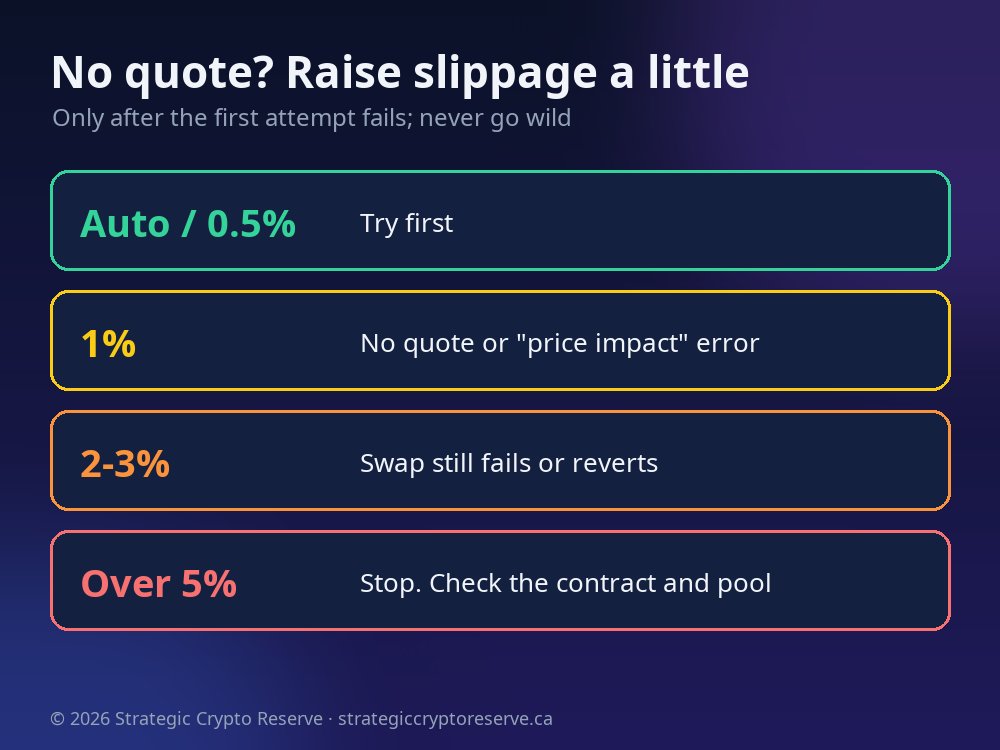
  1. Try the default first (Auto, or 0.5%).
  2. If no quote appears or the swap fails, open the settings (gear) icon on the swap screen and set slippage to 1%.
  3. Still failing? Try 2 to 3%. In MetaMask, values above the presets are set under Custom.
  4. Don't go above about 5%. If it still won't quote, check the network, the contract and your POL balance instead, or try a smaller amount.

A higher tolerance is not a fee, but it can mean a worse fill. Raise it in small steps, only after the first attempt fails.

Slippage guide for swapping $SCR: start on auto or 0.5%, raise to 1% then 2-3% only if there is no quote

Safety Checklist Before You Buy

Never share your recovery phrase. No wallet, exchange, support agent or Strategic Crypto Reserve staff member will ever ask for it.

Check the contract every time: 0x0ffd960881C83Cd63a50d5C944C9F2B866f55a28. Ignore "SCR" tokens that appear in your wallet uninvited or get sent to you in DMs.

Bookmark the swap sites. Fake QuickSwap and MetaMask pages show up in search ads. Not sure about a link? Run it through our free scam website checker.

$SCR is a utility token for the Strategic Crypto Reserve NFT ecosystem, for entertainment and community use. It is not a security, not financial advice and carries no promise of returns. Only use money you can afford to lose.

Hold SCR and want an NFT? See the Polygon NFT and token guide and how $SCR token redemption works, or email support@strategiccryptoreserve.ca. New to Polygon? Read what the POL token is and how to stake POL.

Frequently Asked Questions

What is the $SCR token contract address on Polygon?

The only $SCR contract is 0x0ffd960881C83Cd63a50d5C944C9F2B866f55a28 on Polygon PoS (chain ID 137). The token is named Strategic Crypto Reserve, the symbol is SCR and it uses 18 decimals. Any other contract using the SCR name is not ours.

Where can I buy $SCR tokens?

Swap for $SCR on Polygon in a self-custody wallet. The main pool is the QuickSwap SCR/DAI pool, so QuickSwap gives the most direct route. The MetaMask built-in Swap and SushiSwap can also route to it. $SCR is not listed on centralized exchanges.

Why does my wallet not show a quote for SCR?

Usually the network is wrong (it must be Polygon), the SCR contract was not imported, or slippage is too tight for the pool. Switch to Polygon, paste the contract address, then raise slippage slightly, for example from 0.5% to 1% and then 2 to 3%, and try again.

Do I need POL to buy $SCR?

Yes, you need a small amount of POL, the Polygon gas token that replaced MATIC, to pay network fees. A Polygon swap usually costs a few cents. You can bridge straight to POL in MetaMask, or swap a little USDC for POL first.

Can I bridge from Ethereum or Base to buy $SCR?

Yes. Use the Bridge button in MetaMask, choose your source network and token, set Polygon as the destination and receive POL or USDC. Once the funds arrive on Polygon, swap them for $SCR.

Is $SCR an investment?

No. $SCR is a utility token for the Strategic Crypto Reserve NFT ecosystem, for entertainment and community use. It is not a security, not financial advice and carries no promise of returns. Only use money you can afford to lose.

Ready to Buy $SCR on Polygon?

Polygon network, a little POL for gas, the contract 0x0ffd960881C83Cd63a50d5C944C9F2B866f55a28, then swap. That's it.

Not financial advice. Terms · Privacy.